Gemini Live: The Dawn of a More Helpful, Natural and Visual AI Assistant

Written by
admin

Get the oars in the water and start rowing. Execution is the single biggest factor in achievement so the faster and better your execution.
Gemini Live: The Dawn of a More Helpful, Natural and Visual AI Assistant
Introduction: The Evolution of Digital Assistance:
In the rapidly evolving landscape of artificial intelligence, Google's Gemini Live emerges as a transformative force in how we interact with our devices. This isn't just another incremental update to existing technology—it represents a fundamental shift in what we can expect from AI assistants. By combining advanced visual capabilities with remarkably natural conversational interfaces, Gemini Live is poised to become the universal AI assistant that understands your world, assists with completing any task, and remains available to explore any idea.
As someone who has tested countless digital assistants over the years, I've been particularly impressed by how Gemini Live has evolved from its initial launch just last year. What began as a promising voice interface has rapidly transformed into a multimodal powerhouse that can see what you see, understand what you're working on, and provide contextual help in ways that feel genuinely magical. The August 2025 updates have particularly elevated the experience, making Gemini Live not just helpful but truly intuitive in its assistance.
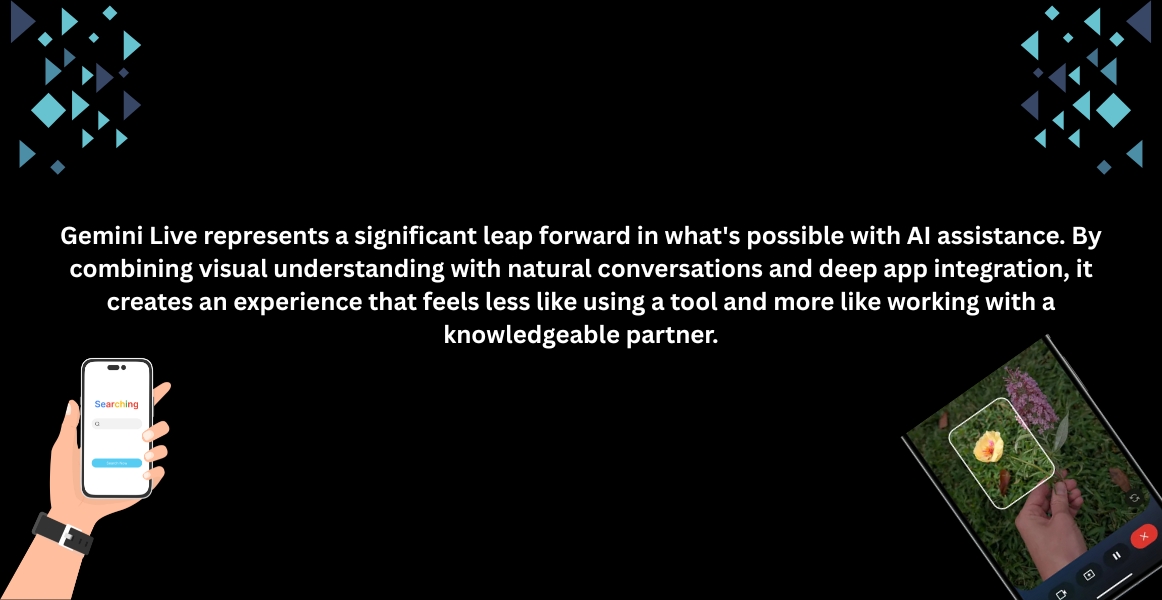
 The most striking advancement in Gemini Live is its new visual guidance capability. When you share your camera, Gemini doesn't just see what you see—it can now provide visual guidance by highlighting things directly on your screen. These real-time visual cues create a powerful new way to learn and solve problems together with AI .
Imagine you're trying to decide between two pairs of sneakers. With Gemini Live, you can simply point your camera at them, and Gemini will highlight the one that best matches the outfit you're envisioning. Or perhaps you're struggling to identify the correct tool for a home repair project—point your camera at your toolbox, and Gemini can point out the right one with a clear visual indicator 1. This capability transforms your phone from a passive tool into an active visual assistant that can literally point you in the right direction.
What makes Gemini's visual capabilities particularly impressive is how they handle complex, real-world scenarios. During Google's briefing, a product manager shared a personal example from a recent international trip. He was struggling to figure out if he could park in a certain spot, unable to make sense of the foreign-language signs, road markings, and local regulations. After pulling out his phone and opening Gemini Live, he pointed his camera at the scene and asked if parking was allowed. Gemini looked up the local rules, translated the signs, and then highlighted a spot on the street where he could park for free for the next two hours 10.
This example demonstrates how Gemini Live combines visual analysis with contextual understanding and real-time information retrieval to provide assistance that feels almost like having a local expert by your side. The visual guidance feature will be available on the Pixel 10 series at launch and will roll out to other Android devices starting the week of August 28th, with iOS support coming in the following weeks.
A true AI assistant does more than just answer questions—it helps you manage your schedule and connects you with the people in your life, all in one seamless flow. Gemini Live now integrates more deeply with the Google ecosystem, including Google Calendar, Keep, and Tasks, with Messages, Phone, and Clock apps coming soon.
These integrations enable remarkably fluid workflows. For instance, if you're brainstorming birthday gift ideas for your mom with Gemini Live, when you land on the perfect one, you can seamlessly say, "...that's it! Call Dad so I can ask him to pick it up." Similarly, if you're talking with Gemini to find the fastest subway route and realize you're running behind, you can simply interrupt and say, "This route looks good. Now, send a message to Alex that I'm running about 10 minutes late." Gemini can draft the text, and you can get back to your navigation without missing a beat .
Practical Everyday Assistance
The power of these integrations becomes evident in everyday scenarios:
Juggling your schedule:Talk through your appointments on your Google Calendar, and ask Gemini to set a reminder in Google Tasks for you to pick up your prescription before the pharmacy closes.
Meal planning:If you're brainstorming a new recipe for dinner, you can ask Gemini to add all the ingredients to a new shopping list in Google Keep.
Email management: Ask Gemini to "Check Gmail for the Chicago restaurant recommendations that Clara sent me" or "Draft a short bio based on my resume in Google Drive".
The most striking advancement in Gemini Live is its new visual guidance capability. When you share your camera, Gemini doesn't just see what you see—it can now provide visual guidance by highlighting things directly on your screen. These real-time visual cues create a powerful new way to learn and solve problems together with AI .
Imagine you're trying to decide between two pairs of sneakers. With Gemini Live, you can simply point your camera at them, and Gemini will highlight the one that best matches the outfit you're envisioning. Or perhaps you're struggling to identify the correct tool for a home repair project—point your camera at your toolbox, and Gemini can point out the right one with a clear visual indicator 1. This capability transforms your phone from a passive tool into an active visual assistant that can literally point you in the right direction.
What makes Gemini's visual capabilities particularly impressive is how they handle complex, real-world scenarios. During Google's briefing, a product manager shared a personal example from a recent international trip. He was struggling to figure out if he could park in a certain spot, unable to make sense of the foreign-language signs, road markings, and local regulations. After pulling out his phone and opening Gemini Live, he pointed his camera at the scene and asked if parking was allowed. Gemini looked up the local rules, translated the signs, and then highlighted a spot on the street where he could park for free for the next two hours 10.
This example demonstrates how Gemini Live combines visual analysis with contextual understanding and real-time information retrieval to provide assistance that feels almost like having a local expert by your side. The visual guidance feature will be available on the Pixel 10 series at launch and will roll out to other Android devices starting the week of August 28th, with iOS support coming in the following weeks.
A true AI assistant does more than just answer questions—it helps you manage your schedule and connects you with the people in your life, all in one seamless flow. Gemini Live now integrates more deeply with the Google ecosystem, including Google Calendar, Keep, and Tasks, with Messages, Phone, and Clock apps coming soon.
These integrations enable remarkably fluid workflows. For instance, if you're brainstorming birthday gift ideas for your mom with Gemini Live, when you land on the perfect one, you can seamlessly say, "...that's it! Call Dad so I can ask him to pick it up." Similarly, if you're talking with Gemini to find the fastest subway route and realize you're running behind, you can simply interrupt and say, "This route looks good. Now, send a message to Alex that I'm running about 10 minutes late." Gemini can draft the text, and you can get back to your navigation without missing a beat .
Practical Everyday Assistance
The power of these integrations becomes evident in everyday scenarios:
Juggling your schedule:Talk through your appointments on your Google Calendar, and ask Gemini to set a reminder in Google Tasks for you to pick up your prescription before the pharmacy closes.
Meal planning:If you're brainstorming a new recipe for dinner, you can ask Gemini to add all the ingredients to a new shopping list in Google Keep.
Email management: Ask Gemini to "Check Gmail for the Chicago restaurant recommendations that Clara sent me" or "Draft a short bio based on my resume in Google Drive".
These capabilities transform Gemini from a question-answering tool into a proactive assistant that can actually help you accomplish tasks across your digital life. The assistant becomes a unified interface for your phone, capable of understanding natural language requests that would previously require navigating multiple apps manually.
Perhaps the most remarkable improvement in Gemini Live is how natural the conversations have become. Google is launching new model updates that dramatically improve how Gemini Live uses the key elements of human speech, like intonation, rhythm and pitch, allowing for more responsive and expressive conversations.
Soon, you'll be able to:
Experience more natural and intuitive interactions where Gemini responds more appropriately to what you say. If you're talking about a stressful topic, it might respond with a calmer, more measured voice.
Control how Gemini speaks. You'll be able to ask Gemini to speak more slowly if you're taking notes, faster if you're in a hurry, or even in a fun accent to liven things up.
Enjoy dramatic storytelling. Ask Gemini to tell you about the Roman empire from the perspective of Julius Caesar himself, and get a rich, engaging narrative complete with character accents
Gemini Live now handles the natural flow of conversation much like a human would. You can interrupt it mid-sentence to add more details or change the topic entirely 6. This ability to "change your mind mid-sentence" makes the interactions feel significantly more natural than previous digital assistants that required rigid command structures or would frustratingly continue talking while you were trying to interject.
The conversational experience is designed to adapt to your speaking style rather than forcing you to adapt to the technology. This represents a significant advancement in how we interact with AI systems, moving from command-based interactions to truly free-flowing conversations.
Gemini Live shines as an educational tool. Students can use the camera sharing feature to get help with physical objects—imagine pointing your camera at a complex diagram in a textbook and asking Gemini to explain it differently. The document analysis capabilities allow you to upload files like syllabi or research papers and have natural conversations about their content.
For language learners, Gemini Live offers opportunities to practice conversations in dozens of languages. You can have natural dialogues, ask for translations of objects you point your camera at, or even request cultural context for phrases and customs.
Home improvement tasks become significantly easier with visual guidance. When trying to assemble furniture or repair appliances, you can point your camera at the components and ask questions like "Which screw goes here?" or "How do I attach this piece?" Gemini can highlight specific parts and provide step-by-step guidance tailored to what it sees.
The same capabilities extend to cooking—show Gemini your ingredients and it can suggest recipes; point your camera at your stove and it can guide you through techniques while monitoring your progress.
Writers, designers, and other creative professionals can use Gemini Live as a brainstorming partner. The ability to have natural conversations about visual materials—whether shared through the camera, screen, or uploaded images—makes it excellent for working through creative blocks and exploring new ideas.
You can share your screen while designing and ask for feedback, or point your camera at your artwork and discuss possible improvements. The multimodal capabilities mean Gemini can understand and respond to both the visual elements and your verbal questions simultaneously.
With these powerful capabilities come legitimate privacy concerns. Google emphasizes that they've built privacy controls that ensure audio, screen shares, and video data are, by default, only stored in Gemini Apps Activity and will never be used for product improvement without explicit permission.
Users can manage their privacy settings through Gemini Apps Activity, controlling what's saved and how it's used. The system is designed with privacy in mind—for instance, when your camera is on in a Live chat, it automatically turns off if you leave the Gemini app or your screen locks.

Google provides clear guidelines for responsible use of Gemini Live, including respecting others' privacy and asking permission before recording or including them in a Live chat 6. These considerations are particularly important given the always-listening nature of the technology and its ability to analyze visual scenes that might include unsuspecting individuals.
